
Your robots.txt AI crawlers is the first technical gate between your website and every AI search engine that might cite you. Most sites were set up years before ChatGPT existed, which means a significant portion of the web is unintentionally invisible to AI search right now.
This guide covers every major AI crawler user-agent string, ready-to-paste robots.txt code, and the Cloudflare setting that can silently override everything you configure in robots.txt.
Why robots.txt Matters More for AI Search Than It Did for Google
Traditional search engines like Google have sophisticated signals that help them evaluate content even when access is limited. AI crawlers do not work the same way: if they cannot read your page, they simply skip it.
Blocking GPTBot means ChatGPT cannot include your content in search answers, regardless of how good that content is. Blocking PerplexityBot removes you from Perplexity results entirely. The stakes are higher because the pool of sources AI engines cite is far smaller than a traditional search result page.
Only 37% of the top 10,000 domains currently have a robots.txt file, according to Cloudflare’s 2026 crawl analysis. Of those that do, fewer than 8% have any specific AI crawler rules at all. Most sites are running on whatever default was set years ago, and those defaults may be blocking AI access without the site owner knowing.
The Complete List of AI Crawler User-Agent Strings (2026)
There are two types of AI crawlers you need to understand: training crawlers and retrieval crawlers. Training crawlers collect data to build AI models. Retrieval crawlers fetch content in real time to answer user queries. For a deeper explanation of how this retrieval process works, see our guide on how AI search engines work. The difference matters because you can block training without blocking visibility.
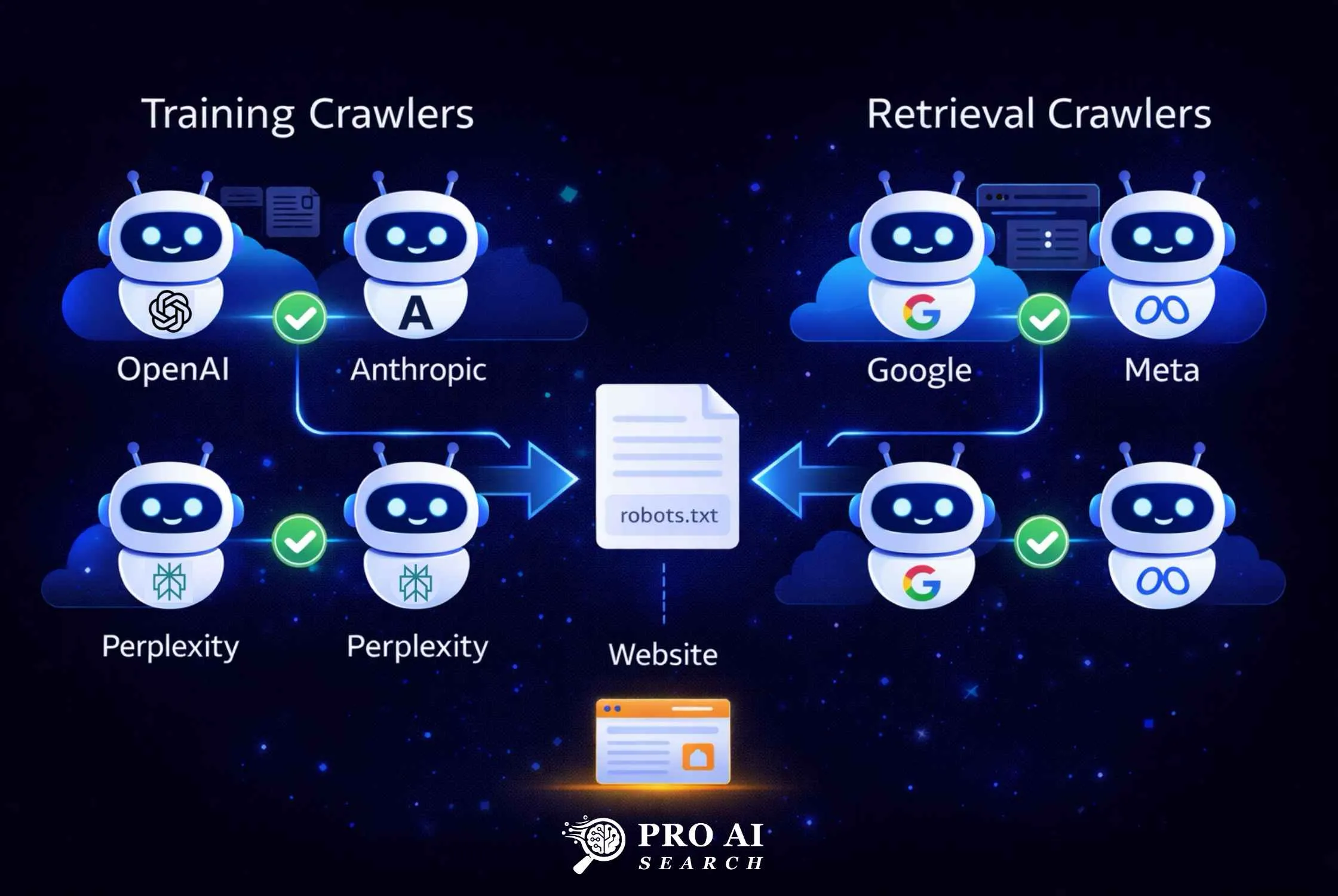
The table below covers every major AI crawler you need to account for in 2026.
| Platform | User-Agent | Type | What It Does |
|---|---|---|---|
| ChatGPT (search index) | OAI-SearchBot | Retrieval | Builds the search index used in ChatGPT Search results |
| ChatGPT (real-time browsing) | ChatGPT-User | Retrieval | Fetches pages live during a user’s ChatGPT session |
| ChatGPT (training) | GPTBot | Training | Collects data to train future OpenAI models |
| Perplexity (indexing) | PerplexityBot | Retrieval | Indexes content for Perplexity search answers |
| Perplexity (user-triggered) | Perplexity-User | Retrieval | Fetches pages when users ask about specific URLs |
| Claude (training) | ClaudeBot | Training | Collects data to train Anthropic’s Claude models |
| Claude (search) | Claude-SearchBot | Retrieval | Indexes content for Claude’s web search feature |
| Claude (user-triggered) | Claude-User | Retrieval | Fetches pages during individual Claude user sessions |
| Google AI (training) | Google-Extended | Training | Powers Gemini training; separate from Google Search crawl |
| Meta AI | meta-externalagent | Both | Powers Meta AI across WhatsApp, Instagram, Facebook |
| Common Crawl | CCBot | Training | Open training dataset used by many LLMs |
Important note on Google-Extended: Blocking Google-Extended does not block your site from appearing in Google AI Overviews. AI Overviews use the standard Googlebot. Google-Extended specifically controls whether your content enters Gemini model training. These are separate systems.
Important note on OpenAI: OpenAI documents three distinct crawlers: GPTBot for training, OAI-SearchBot for search indexing, and ChatGPT-User for real-time browsing. You can block GPTBot to prevent training use while still allowing OAI-SearchBot and ChatGPT-User for citation visibility.
What Happens When You Block Retrieval Crawlers?
Blocking retrieval crawlers removes your site from AI search answers immediately. If OAI-SearchBot cannot access your site, ChatGPT Search will not cite you. If PerplexityBot is blocked, your content does not appear in Perplexity answers. The impact is direct and immediate, unlike traditional SEO where a blocked page may still benefit from domain-level signals.
How to Allow All AI Crawlers in robots.txt
The safest default for most businesses is to allow all AI retrieval crawlers while keeping training crawlers optional. The code block below covers every major platform.
Add this to your robots.txt file. Rule order matters: specific user-agent rules take precedence over the wildcard User-agent: * rule.
# AI Search and Retrieval Crawlers - Allow
User-agent: OAI-SearchBot
Allow: /

User-agent: ChatGPT-User
Allow: /

User-agent: PerplexityBot
Allow: /

User-agent: Perplexity-User
Allow: /

User-agent: Claude-SearchBot
Allow: /

User-agent: Claude-User
Allow: /

User-agent: Google-Extended
Allow: /

User-agent: meta-externalagent
Allow: /

# AI Training Crawlers - Allow (optional: block these if you want)
User-agent: GPTBot
Allow: /

User-agent: ClaudeBot
Allow: /

User-agent: CCBot
Allow: /

# All other bots
User-agent: *
Allow: /

Sitemap: https://yourdomain.com/sitemap.xml
Your live robots.txt file is always accessible at yourdomain.com/robots.txt. Verify it loaded correctly after saving.
How to Block Specific AI Crawlers
If you want to prevent training data collection while staying visible in AI search answers, use this split configuration. This is the most common approach in 2026, according to Cloudflare’s AI crawler analysis.
# Allow AI search visibility - Retrieval crawlers
User-agent: OAI-SearchBot
Allow: /

User-agent: ChatGPT-User
Allow: /

User-agent: PerplexityBot
Allow: /

User-agent: Claude-SearchBot
Allow: /

User-agent: Claude-User
Allow: /

User-agent: Google-Extended
Allow: /

# Block AI training crawlers
User-agent: GPTBot
Disallow: /

User-agent: ClaudeBot
Disallow: /

User-agent: CCBot
Disallow: /

# All other bots (Google Search, Bing, etc.)
User-agent: *
Allow: /

Sitemap: https://yourdomain.com/sitemap.xml
This configuration keeps your site visible in ChatGPT Search, Perplexity, and Claude search results while opting out of your content being used for model training. Making your site accessible to Claude’s crawlers is the technical foundation. Our guide on what Claude actually cites explains the content signals Claude uses to select sources beyond crawler access.
Should You Block AI Crawlers from Specific Sections?
Some content should be protected regardless of your overall strategy. Block AI crawlers from: /wp-admin/, /checkout/, /account/, /private/, and any pages behind authentication. Allow full access to all public content: blog posts, resource pages, product descriptions, and service pages.
User-agent: GPTBot
Allow: /
Disallow: /wp-admin/
Disallow: /checkout/
Disallow: /account/
The Cloudflare Warning Every WordPress Site Owner Must Read
This is the most important section in this article for WordPress users. Cloudflare’s AI bot blocking setting can override your robots.txt entirely, and most site owners do not know it is active.
What happened on July 1, 2025: Cloudflare flipped “Block on all pages” as the default setting for every new domain added to Cloudflare. Cloudflare protects roughly 20% of all websites on the internet. That means a significant share of the web moved from “AI can crawl by default” to “AI is blocked by default” overnight.
Why this is not obvious: When Cloudflare blocks an AI crawler, the block happens at the edge, before the request ever reaches your server. Your server access logs show nothing. Cloudflare’s own security dashboard is where the 403 responses appear, and most site owners never check it.
I ran into this personally with VEGA AI, our SaaS product for educational institutions. PerplexityBot and ClaudeBot were hitting the site and getting blocked at the Cloudflare layer for months. The robots.txt was correctly configured, but it was irrelevant because Cloudflare was rejecting the requests before robots.txt was ever consulted. After disabling the AI bot block, both crawlers started appearing in server access logs within 48 hours, and AI-sourced referral traffic began generating measurable sessions within six weeks. For the exact GA4 setup to track this traffic, see our guide on setting up GA4 for AI search tracking.
How to check and fix this:
- Log in to your Cloudflare dashboard
- Go to Security > Settings
- Filter by “Bot traffic”
- Find Block AI bots
- Under Configurations, select the edit icon
- Choose “Do not block (off)” to allow all AI crawlers
- Select Save
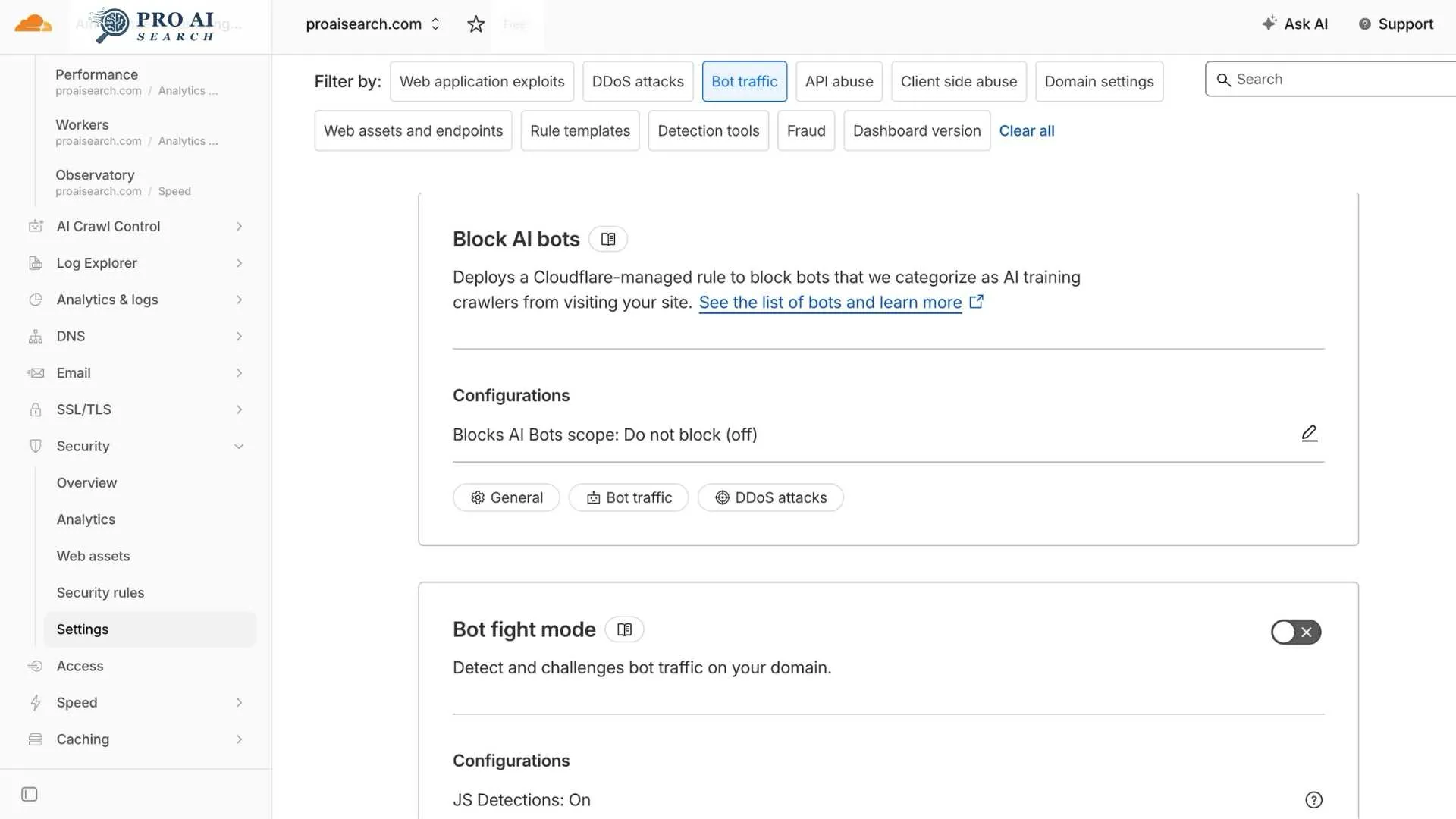
For granular control by specific bot, use AI Crawl Control (Security > Bots > AI Crawl Control) which shows per-crawler request counts and lets you allow or block individual user-agents.
Important: Cloudflare’s block rule takes precedence over all other Super Bot Fight Mode rules. Even if you have a custom “allow” rule for GPTBot, the AI block managed rule overrides it unless you explicitly disable the block first.
How to Edit robots.txt in WordPress via Rank Math
Rank Math has a built-in robots.txt editor, so you do not need FTP access or a file manager to make changes.
- In your WordPress admin, go to Rank Math > General Settings
- Click Edit robots.txt
- The editor shows your current rules
- Add your AI crawler blocks (copy from the code blocks above)
- Click Save Changes
- Verify at
yourdomain.com/robots.txtin a browser
Your changes take effect immediately. AI crawlers typically re-request robots.txt before each crawl session, so updated rules are picked up within hours to days depending on the crawler’s schedule.
One caution for Rank Math users: If another plugin (including Yoast, if you ever had it installed) or a caching plugin is generating a virtual robots.txt, Rank Math’s editor may be editing a different file than what is actually being served. Always verify by loading yourdomain.com/robots.txt directly in a browser after saving to confirm your rules appear.
How to Verify AI Bots Can Access Your Site
Configuring robots.txt is half the work. Verifying it is working is the other half. Our dedicated guide on how to check if AI can read your website walks through five free verification methods in detail.
Method 1: Server access logs
Search your server logs for AI user-agent strings. On a Linux server:
grep -Ei "GPTBot|OAI-SearchBot|ChatGPT-User|ClaudeBot|Claude-SearchBot|PerplexityBot|Google-Extended" access.log | awk '{print $1, $7, $12}' | head -50
If you see these user agents appearing with 200 responses, your configuration is working. If you see 403 responses, Cloudflare or a WAF rule is blocking them.
Method 2: Google Search Console for Google-Extended
Google Search Console does not directly report Google-Extended crawl activity, but it does report crawl errors. If Google-Extended requests are returning errors, they show up in Coverage reports.
Method 3: Curl simulation
Test whether a specific crawler is blocked by simulating its user-agent:
curl -A "Mozilla/5.0 AppleWebKit/537.36 (KHTML, like Gecko; compatible; GPTBot/1.1; +https://openai.com/gptbot)" https://yourdomain.com/sample-page/ -I
A 200 response means access is allowed. A 403 means it is being blocked, likely at the Cloudflare layer since robots.txt does not return HTTP status codes.
Method 4: OpenAI’s verification documentation
OpenAI publishes IP ranges for each of its crawlers at the following JSON files: openai.com/gptbot.json, openai.com/searchbot.json, and openai.com/chatgpt-user.json. You can cross-reference any suspicious bot traffic against these published ranges to confirm whether a visit genuinely came from OpenAI.
robots.txt vs llms.txt: What Is the Difference?
These are two separate files with different functions. robots.txt controls whether AI crawlers can access your pages. llms.txt tells AI models what your site is about and which pages matter most, even for models that already have your content in their training data.
Update (May 2026): Google has officially confirmed that llms.txt has no effect on Google AI Overviews or AI Mode. Its impact on ChatGPT and Perplexity remains unconfirmed. If you are optimizing for Google’s AI features, you can skip llms.txt. If optimizing for ChatGPT or Perplexity, it remains a low-cost step worth trying. Our full study on whether llms.txt helps SEO breaks down the platform-specific evidence.
You need both. robots.txt is the access layer. llms.txt is the context layer. A site with robots.txt correctly configured but no llms.txt is visible but under-described. A site with llms.txt but with crawlers accidentally blocked via Cloudflare is well-described but invisible. For a detailed implementation guide, the LLM SEO pillar on this site covers the full technical setup including llms.txt creation, schema markup, and JavaScript rendering issues.
FAQ: robots.txt for AI Crawlers
Does blocking GPTBot affect my Google rankings?
No. GPTBot is an OpenAI crawler and has no connection to Google’s indexing systems. Googlebot and GPTBot are entirely separate programs. Blocking GPTBot does not affect your position in Google Search results or your visibility in Google AI Overviews in any way.
Which AI crawlers should I allow vs block?
Allow all retrieval crawlers: OAI-SearchBot, ChatGPT-User, PerplexityBot, Claude-SearchBot, and Claude-User. These power real-time AI search answers and citations. Training crawlers (GPTBot, ClaudeBot, CCBot) are optional. Blocking them prevents your content from entering model training datasets but does not remove you from AI search results.
Does robots.txt affect Google AI Overviews specifically?
No. Google AI Overviews use the standard Googlebot, not Google-Extended. If your site is accessible to Googlebot and you rank on page 1 for a query, you are eligible for Google AI Overviews. Google-Extended only controls Gemini model training, not AI Overviews sourcing. For a complete guide to AI Overviews eligibility, see How to Appear in Google AI Overviews.
How do I know if an AI bot has visited my site?
Check your server access logs for the user-agent strings listed in this article. On WordPress with LiteSpeed Cache, access logs are in your hosting control panel under Log Viewer. If you use Cloudflare, check Security > Security Events in the Cloudflare dashboard for any 403 responses issued to AI user-agents. You can also use the curl simulation method in the verification section above.
What is the difference between ChatGPT-User and GPTBot?
GPTBot crawls your site on its own schedule to collect training data for future OpenAI models. ChatGPT-User fetches your pages in real time when a specific user is asking ChatGPT a question that requires live web access. OAI-SearchBot builds the background search index that ChatGPT draws from. All three can be controlled independently in robots.txt. If your goal is AI search visibility rather than training data control, allow OAI-SearchBot and ChatGPT-User, and make your own decision on GPTBot.
Does Perplexity-User respect robots.txt?
Perplexity’s behavior here is contested. PerplexityBot (the indexing crawler) respects robots.txt directives and is documented by Perplexity. Perplexity-User (user-triggered fetching) may bypass robots.txt in cases where a user provides a specific URL as context, treating the request as user-initiated rather than automated crawling. Cloudflare published a detailed investigation into Perplexity’s robots.txt compliance in 2024. This is worth knowing, but it does not change the recommendation to configure robots.txt correctly: the rules apply to the declared bot behavior, and most Perplexity crawling respects them. For a full 30-point technical readiness check beyond just robots.txt, use our technical GEO audit checklist.