
Whether does llms.txt help SEO is the right question depends on what you mean by “help.” If you mean Google rankings: no, Google has explicitly said it doesn’t use the file as a ranking signal. If you mean AI search citations from ChatGPT or Perplexity: the data shows no measurable citation uplift for most sites. But if you mean making your site cheaper for AI agents to process and giving Perplexity a faster path to your content: there is a real, documented case for it. This article covers all three honestly. I run Pro AI Search, India’s first dedicated AI search optimization resource, and I’ve been watching the llms.txt discussion closely since Jeremy Howard proposed the standard in September 2024. The noise around this file has outpaced the evidence. Here is what the actual data says, what Google confirmed, and when creating the file genuinely makes a difference for your site.
What llms.txt Actually Does (and What It Was Designed For)
llms.txt is a plain-text markdown file placed at the root of your domain (yoursite.com/llms.txt) that gives AI systems a structured, low-cost map of your most important pages. The specification was proposed by Jeremy Howard in September 2024, modeled loosely on robots.txt but designed for a different purpose: not to restrict access, but to guide AI systems to your most useful content with minimal processing cost. The key technical advantage is tokenization efficiency. When an AI system visits your homepage and scrapes raw HTML, it has to tokenize everything: the HTML tags, CSS references, JavaScript, navigation menus, footers, and cookie banners before it reaches the actual content. A Wix AI Search Lab comparison found that a homepage HTML file required 15,085 tokens to process, while the same site’s llms.txt required only 158 tokens, a 95x difference. At Gemini 2.5 Flash pricing of $0.10 per 1,000 tokens, processing one HTML homepage costs roughly 286 times more than processing a well-structured llms.txt file. The format is straightforward. At minimum, your llms.txt should include a title, a brief description of your site, and a list of your most important pages with URLs and one-line descriptions. Here is what a complete llms.txt looks like for a content site:
# Pro AI Search

> India's first dedicated resource for AI search optimization. Expert guides on GEO, AEO, and LLM SEO for content marketers and SEOs in India and globally.

## Pillar Pages

- [Generative Engine Optimization](https://proaisearch.com/generative-engine-optimization/): Complete guide to optimizing content for AI search engines including ChatGPT, Gemini, and Perplexity
- [Answer Engine Optimization](https://proaisearch.com/answer-engine-optimization/): How to structure content so AI systems extract and cite it directly
- [LLM SEO](https://proaisearch.com/llm-seo/): Technical implementation guide for making your site readable by large language models
- [AI SEO](https://proaisearch.com/ai-seo/): Multi-platform AI search strategy covering all major AI citation surfaces

## Key Guides

- [Robots.txt for AI Crawlers](https://proaisearch.com/robots-txt-ai-crawlers/): How to configure crawler access for GPTBot, ClaudeBot, PerplexityBot, and Bingbot
- [AI Search Statistics 2026](https://proaisearch.com/ai-search-statistics-2026/): Market share, usage data, and citation trends across AI search platforms
- [Does AI Search Affect SEO?](https://proaisearch.com/geo-vs-seo/): What changes when users shift from Google to AI search engines

## About

Founded by Amit Kumar, Growth Manager at LearnQ.ai (VEGA AI). Based in Bengaluru, India.
Contact: amit@proaisearch.com
That is the complete structure. No special syntax, no server configuration, no plugin required. The specification intentionally keeps it simple so AI systems can parse it without additional tooling. The full LLM SEO technical guide covers llms.txt alongside robots.txt, schema markup, and the other technical layers that determine whether AI systems can read and cite your content.
Does llms.txt Help SEO? What Google Actually Said
No, llms.txt does not improve your Google search rankings. In July 2025, Google’s Gary Illyes stated publicly that Google does not support llms.txt and has no current plans to do so. John Mueller, Google’s Search Relations lead, drew a direct comparison to the meta keywords tag, a tag that Google crawls but has explicitly not used as a ranking signal since 2009. The parallel is accurate: Google reads the file, logs it, but takes no ranking action based on its contents. Here is the nuance that most coverage misses: Google does crawl and index llms.txt files at scale. By May 2026, Google had indexed approximately 120,000 llms.txt files globally, up from 30,000 to 60,000 in October 2025, with a peak of around 200,000 files indexed in April 2026. A Wix AI Search Lab study analyzing 586 indexed llms.txt files found that nearly 6% of them were ranking for organic keywords, including navigational and branded queries. When a llms.txt file ranks in Google’s organic results, it becomes accessible to any AI system using Google’s index as a RAG (retrieval-augmented generation) source, including Google AI Mode, ChatGPT Search, and Perplexity. So the technical accuracy is: llms.txt does not help your other pages rank in Google. But the file itself can be indexed and can rank, and when it does, it enters the same RAG pipeline that AI search systems use to ground their answers. That is a meaningful distinction for sites whose llms.txt contains genuinely useful structured information.
Do AI Crawlers Actually Read Your llms.txt?
The honest answer based on actual log data: most major AI crawlers do not directly request /llms.txt at the URL level. ALLMO.ai analyzed 515 million LLM bot traffic events and found that requests to /llms.txt from bots driving AI search citations were statistically negligible. In a separate analysis of 94,000+ URLs that appear as citations in AI search results, ALLMO.ai found no measurable citation uplift associated with having a llms.txt file versus not having one. This does not mean the file is never accessed. There is documented evidence that Perplexity accesses llms.txt independently of Google’s RAG pipeline in some cases. The Wix AI Search Lab analysis included a weather.com test where the llms.txt contents were not indexed in Google (a verbatim search returned zero results), yet Perplexity cited the llms.txt as its top source for a query about URL structure on the site. This suggests PerplexityBot may directly crawl and reference llms.txt files independently of what Google has indexed, at least for some queries and domains. The August 2025 audit by Longato corroborates the general finding: across sites analyzed, none of the major LLM crawlers (GPTBot, ClaudeBot, PerplexityBot, Meta’s crawler) showed consistent direct requests for /llms.txt as a standard crawl behavior. The file is not on a mandatory crawl path for any of the current major AI platforms in the way that robots.txt is. Our guide on checking whether AI can read your website covers how to inspect your own server logs to see which AI bots are actually visiting your domain and what they are requesting.
The Real Reason to Create llms.txt: Agentic AI Efficiency
The strongest documented case for llms.txt is not AI search citations: it is agentic AI. Gartner reported in early 2026 that 64% of technology executives plan to deploy agentic AI within the next 24 months. AI agents, systems that visit websites programmatically to retrieve information for multi-step tasks, are a fundamentally different type of AI interaction than a user asking ChatGPT a question. Agents need to access site content frequently, efficiently, and at scale. Token cost is a real constraint for agentic systems. At $0.10 per 1,000 tokens (Gemini 2.5 Flash model pricing), processing one standard homepage HTML file costs approximately $0.0045, while processing one llms.txt costs approximately $0.0000158. An AI agent can process your llms.txt 286 times for the same cost as processing your homepage once. Agents that aggregate information across multiple sites have a direct financial incentive to prefer sites that offer low-cost access to structured content maps. Anthropic explicitly recommends llms.txt in their Writing for Agents engineering guidance for developer documentation, and OpenAI has implemented llms.txt on their Agents SDK documentation for exactly this reason. This agentic angle connects directly to your broader answer engine optimization strategy. The sites that agents return to repeatedly will be those that make structured, accurate information available at minimal processing cost. llms.txt is one mechanism for this. It is not the only one, and it is not the most important one right now, but as agentic AI use grows, its relative importance will increase. Our technical GEO audit checklist includes llms.txt as one of the 12 technical checks specifically for this forward-looking reason.
Fix This Before You Create Your llms.txt
There is one configuration issue that makes llms.txt completely useless, and it affects a significant portion of Indian WordPress sites: Cloudflare Bot Fight Mode. When enabled, Cloudflare’s Bot Fight Mode intercepts requests from bots it classifies as potentially abusive at the WAF (Web Application Firewall) level, before the request ever reaches your web server. GPTBot (OpenAI’s crawler), ClaudeBot (Anthropic’s crawler), PerplexityBot, and Bingbot are all classified as bots and can be blocked by Bot Fight Mode depending on how your Cloudflare plan and settings are configured. If these bots are being blocked at Cloudflare, they cannot reach your llms.txt file, your robots.txt file, or any page on your site. Creating a perfectly formatted llms.txt adds zero value in this scenario. The correct order of operations is: check your AI crawl access first, fix any WAF-level blocks, verify bots can reach your domain, configure your robots.txt for AI crawlers, and then create your llms.txt as the final layer. Our complete guide on whether AI can read your website walks through exactly how to check your Cloudflare settings and verify that each major AI crawler can reach your server. Fixing a Cloudflare block has a far larger impact on your AI search visibility than adding llms.txt. Do that first.
How to Create Your llms.txt File (Step-by-Step)
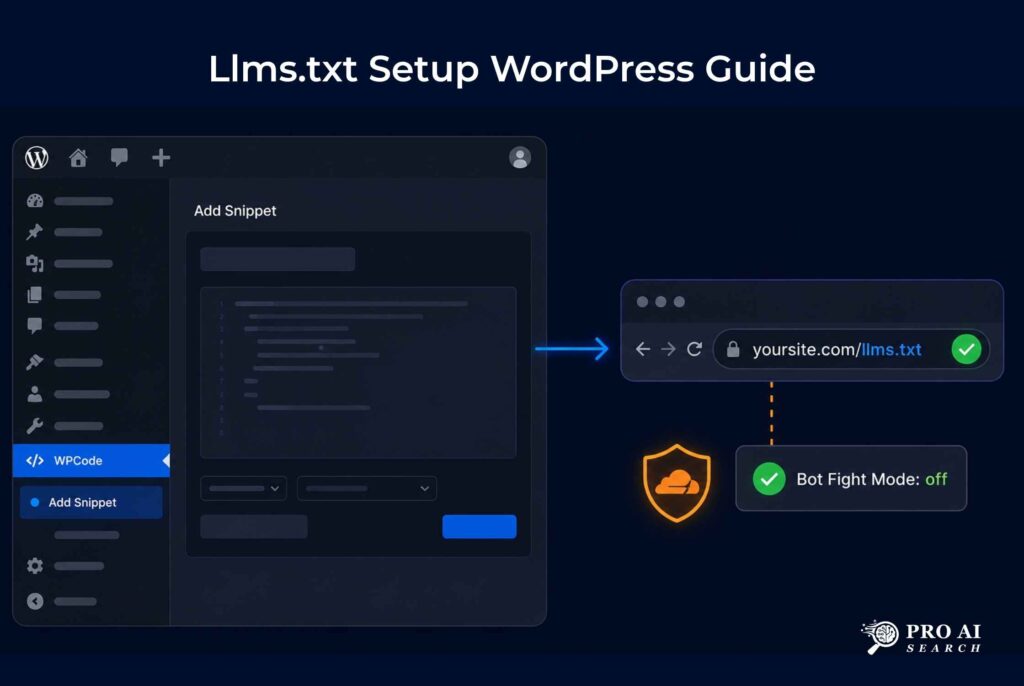
Creating llms.txt takes 30 minutes for most sites. Here is the exact process for a WordPress site using WPCode, which is the recommended implementation method because it lets you manage the file from inside WordPress without needing FTP or server access.
Step 1: Write your llms.txt content. Use the format shown in the example above. Include your site’s name, a one-line description, your pillar/hub pages with URLs and descriptions, your most important guide or resource pages, and your contact information. Keep it concise: the value comes from having a clean, accurate content map, not from length.
Step 2: Add it via WPCode. In your WordPress dashboard, go to WPCode → Add Snippet. Select “Custom Snippet” and choose “Plain Text/HTML” as the code type. Paste your llms.txt content. In the “Insertion” section, select “Site Wide Header” but change the method to “Auto Insert” and set the location to a custom path. Set the custom path to /llms.txt. Save and activate.
Step 3: Alternatively, use a static file. If you have FTP or cPanel access, you can create a plain text file named llms.txt and upload it to your domain root (the same folder that contains your wp-config.php). This method is slightly more reliable because it does not depend on WordPress processing the request.
Step 4: Verify the file is live. Visit https://yourdomain.com/llms.txt in your browser. You should see the raw markdown text you wrote. If you see a 404, check that the WPCode snippet is activated or that the file was uploaded to the correct directory.
Step 5: Check server logs after 2 weeks. In Google Search Console, check the Coverage report and search for llms.txt. This confirms Google has crawled the file. In your hosting server logs or Cloudflare dashboard, look for requests from PerplexityBot, GPTBot, and ClaudeBot to verify AI crawlers are reaching it. Our AI-friendly content optimization guide covers how to read these signals and what to do once you confirm crawler access.
The Honest Verdict: Should You Create llms.txt?
Create it if your site publishes documentation, in-depth guides, or resource pages that AI agents or researchers would want to navigate efficiently. Create it if Perplexity is already a referral source in your analytics, because Perplexity has the most documented evidence of directly accessing llms.txt outside of RAG. Create it if you want to be prepared for the agentic AI wave Gartner is projecting for 2026 and 2027. The file takes under an hour to set up and the upside compounds over time as agentic AI use grows. Do not create it expecting it to move your Google rankings or directly increase ChatGPT and Perplexity citations in the short term. The data does not support that outcome for most sites right now. The ALLMO.ai study of 94,000 cited URLs found no citation uplift, and Google has explicitly said it does not use the file as a ranking signal. If you are hoping llms.txt will be a shortcut to AI search visibility, the GEO vs SEO breakdown covers what actually moves the needle: structured content, direct answers, entity authority, and crawl access. Those come first. Fix Cloudflare blocks first. Get your robots.txt right second. Publish content that answers specific questions directly third. Then add llms.txt as the fourth layer of your AI SEO technical stack. That sequence matters more than any individual file. For a complete implementation checklist covering all four layers, our AI search optimization services page outlines what a full technical setup looks like for a WordPress site.
Frequently Asked Questions About llms.txt
Does llms.txt help SEO rankings on Google?
No. Google’s Gary Illyes confirmed in July 2025 that Google does not support llms.txt and has no plans to use it as a ranking signal. John Mueller compared it to the meta keywords tag, which Google crawls but ignores for ranking purposes. Google does index llms.txt files (120,000+ as of May 2026), so the file can appear in search results and be picked up by AI systems via RAG, but it does not directly improve your other pages’ rankings.
Do ChatGPT and Perplexity read llms.txt files?
Not consistently via direct crawl for most sites. ALLMO.ai’s analysis of 515 million LLM bot events found llms.txt direct requests were statistically negligible. However, there is evidence that Perplexity accesses llms.txt independently of Google’s index in some cases (the weather.com finding). When llms.txt ranks in Google search, it enters the RAG pipeline used by ChatGPT Search and other Google-grounded AI systems. The most reliable path to AI citations remains quality content and crawl access, not llms.txt specifically.
What is llms.txt and who created it?
llms.txt is a plain-text markdown file placed at your domain root that provides AI systems with a structured map of your most important pages and content. It was proposed by AI researcher Jeremy Howard in September 2024 and published at llmstxt.org. The file is designed to make your site’s content accessible to AI systems with 95x fewer tokens than scraping raw HTML, reducing the computational cost of AI agents accessing your site.
How do I create an llms.txt file in WordPress?
The easiest WordPress method is WPCode: go to WPCode → Add Snippet → Custom Snippet → Plain Text type. Paste your llms.txt markdown content, set the insertion path to /llms.txt, and activate. Alternatively, create a plain text file named llms.txt and upload it via FTP to your WordPress root directory (the same folder as wp-config.php). Verify it is live by visiting yoursite.com/llms.txt in a browser. Check Google Search Console two weeks later to confirm Google has crawled it.
Does Google support llms.txt?
No, not as a ranking or indexing signal for other pages. Google’s Gary Illyes stated in July 2025 that Google does not support the llms.txt specification and is not planning to implement it. However, Google does crawl and index llms.txt files as standard web pages. If your llms.txt is indexed and ranks for relevant keywords, it can appear in Google AI Mode and other search-grounded AI answers via RAG. Google’s non-support means the file does not get preferential treatment, not that Google ignores it entirely.
Is llms.txt the same as robots.txt?
No. robots.txt controls which crawlers are allowed or blocked from accessing your site. llms.txt provides a structured content map to help AI systems navigate your most useful pages. They serve different purposes and both should be configured correctly. robots.txt is mandatory for AI search visibility because blocking AI crawlers there means no AI system can index your content regardless of what your llms.txt says. Configure robots.txt to allow AI crawlers first. Our robots.txt for AI crawlers guide covers the exact syntax for PerplexityBot, GPTBot, ClaudeBot, and Bingbot.
Will llms.txt help me appear in AI search results?
Indirectly and conditionally. Direct citation uplift from llms.txt is not supported by current data (ALLMO.ai 94,000-URL study found no measurable increase). However, if your llms.txt gets indexed by Google and ranks for navigational queries, it can be picked up by search-grounded AI systems via RAG. Perplexity may also access it directly in some cases. The more reliable path to AI citations is publishing content that answers specific questions directly, earning entity authority, and ensuring AI crawlers can access your site without Cloudflare blocks.
Should I create llms.txt for my website in 2026?
Yes, but as a low-priority setup task, not as a primary AI visibility lever. Create it if you have documentation, guides, or structured resources that benefit from a content map. It takes under an hour and positions your site for the growing agentic AI ecosystem. Do not expect it to move rankings or AI search citations directly. Fix Cloudflare Bot Fight Mode blocks first, configure robots.txt correctly second, then add llms.txt as your third technical layer. The technical GEO audit checklist covers the full priority order for all AI search technical setup tasks.